Delay based effects
The delay-based effects also share a common working principle: the audio signal is delayed by a certain amount of time and fed back to the input of the effect. Inside the feedback path there is a high pass and a low pass filter that restricts the frequency spectrum of the feedback audio signal. The delay time can be modulated (i. e. periodically changed) by an LFO (low frequency oscillator). Depending on the delay time, the strength of the modulation and the feedback, this results in a delay (echo), flanger or chorus effect.
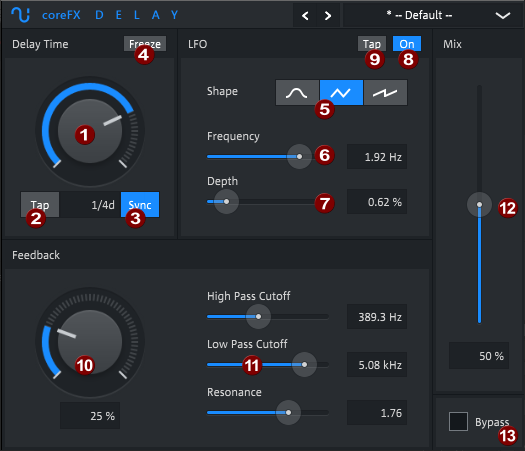
Delay
Delay Time (1): The delay time can be set between 1 ms and 3 seconds. With Tap (2)you can also tap in the delay time. Activate Sync (3) if you want to set the delay time in musical time units, the delay time will be adjusted to the nearest musical time unit depending on the host tempo.
With Freeze (4) on, the delay input is muted and the content of the delay buffer is repeatedly played back. The delay time control can then be used to control the playback speed, with the value display now showing a multiplication factor for the original speed instead of the delay time.
NOTE Automate the delay time for interesting pitch effects!
LFO: The LFO modulation of the delay time is not mandatory for the delay effect. It is just an additional parameter to add small fluctuations to the delay time, simulating the behavior of old tape echo recorders where the tape speed was not always constant. You can select 3 different waveforms for the LFO at Shape (5) and adjust frequency and modulation depth with Frequency (6) and Depth (7). The LFO can be deactivated with the ON/OFF switch (8).
Tap (9): You can also tap in the LFO frequency with this button.
Feedback (10): This determines the portion of the delayed signal that is fed back to the input of the effect. The more feedback is given, the longer the echo effect will last.
High Pass/Low Pass/Resonance (11): Restrict the frequency spectrum of the wet signal with the filters. For instance, move the Low Pass fader to the left to filter out the higher frequency parts from the delayed signal. As the filtering is applied before the feedback, each echo repetition will be a bit more dull and less brilliant. If you move the High Pass fader to the right, you will cut out the low frequencies from the echo. Resonance amplifies this effect.
Mix (11): Adjusts the balance between unprocessed (dry) and processed (wet) audio signal. At 0% only the unprocessed signal is audible, at 100% only processed signal is output.
Flanger
Delay Time: The typical delay time for the flanger is between 1 and 7 ms. The short delay times in combination with high feedback provide the typical tonal effect of the flanger.
LFO: As with the delay, you can chose from 3 different wave forms for the LFO and set the frequency and depth of the modulation. Greater modulation depths are possible than with the delay, since the LFO modulation is essential for the flanger effect.
Feedback: Feedback controls the amount of signal that is sent back to the delay input. The more feedback is given, the stronger the "ringing" of the flanger is.
High Pass/Low Pass/Resonance: Although not essential for a flanger effect, the filter can help to shape the overall sound of the flanger. Be careful with the values for resonance, very high volumes become possible quickly!
Mix: Controls the ratio between the unprocessed and the processed audio signal. For an audible flanger effect, this value must be higher than the typical delay mix or equal to 100%.
Chorus
Delay Time: The typical delay time for the chorus is between 3.5 and 14 ms. The result is a simulated doubling of the signal.
LFO: There are also 3 different waveforms for the LFO with a possible high modulation depth. The modulation of the delay time causes a slightly different pitch of the delayed signal which strengthens the doubling effect.
Feedback: Feedback controls the amount of signal that is sent back to the delay input. This is not absolutely necessary for a chorus effect. But it is not forbidden to use feedback anyway.
High Pass/Low Pass/Resonance: Although not essential for a chorus effect, the filter can help to shape the overall sound of the chorus. This is especially useful to keep the bass unaltered and apply the effect to higher frequencies only.
Mix: As the chorus effect needs a mixture between the delayed and un-delayed signal, you will achieve the best results at around 50%.
Last modified on February 09, 2026
Was this page helpful?
What did you particularly like about this page?
What did you dislike about this page?
Thank you for your feedback.